You run the business.
Balances runs the finances.
$300M+ in bank transactions tracked
Connects to Plaid · Stripe · Zapier · Claude
Read-only bank connections · Export your data anytime
Run your business from wherever you are
On your phone, by text, or inside Claude and ChatGPT. Snap a receipt from the truck, text a question, or ask your AI to send the invoice. Balances asks your AI app to check with you before most changes to your books.
See how it worksIncluded with Pro and Global. No extra charge.Skip the clicks. Just say it.
The tasks that eat your evening, each reduced to a sentence.
The old way
With Balances
The old way
Navigate → Customers → Create Invoice → Fill 9 fields → Save × 200
With Balances
"Create $200 monthly retainer invoices through end of year"
The old way
Pull AR aging → Draft email → Copy invoice number → Send → Repeat
With Balances
Automated reminders fire on their own. Payment links inside.
The old way
Open each transaction → Pick category → Match to vendor → Repeat × 500
With Balances
"Categorize all transactions from Stripe as revenue"
The old way
Maintain a spreadsheet. Hope you tagged everything. Reconcile at month end.
With Balances
Tag expenses to a job. See per-job P&L in real time.
The old way
Export bank statement → Cross-reference ledger → Flag mismatches → Adjust entries
With Balances
"Reconcile checking account for February"
The old way
Select report type → Set date range → Choose filters → Export → Reformat in Excel
With Balances
"Send me a P&L for Q4 broken down by client"
The old way
Review every account → Post adjusting entries → Run trial balance → Generate statements
With Balances
"Close the books for February"
The whole business. In one app.
Get paid, track the work, know where you stand, and stay ready for tax time. Without four different tools.
Meet your agent
Name it. Give it a personality. Teach it how you work.
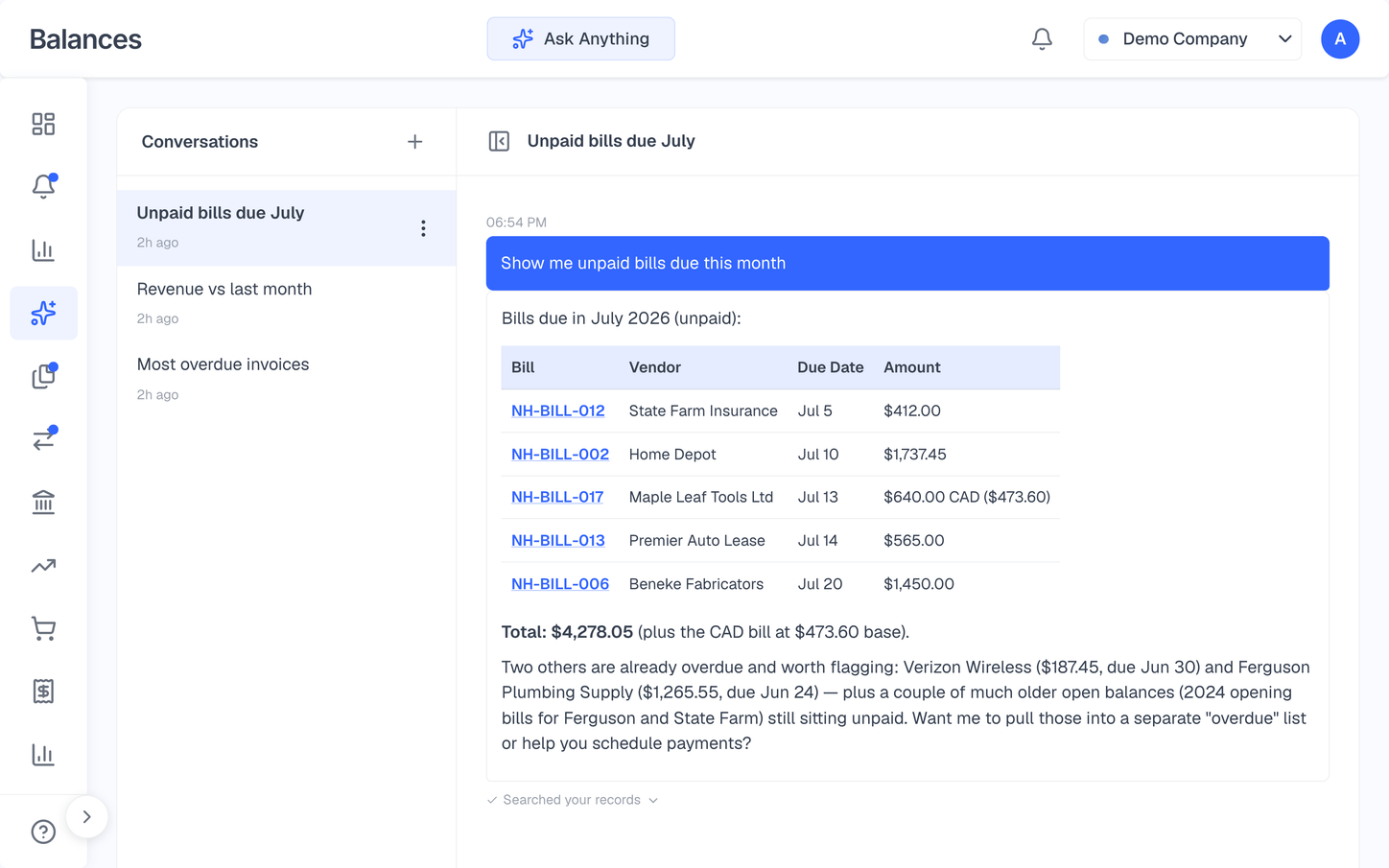
Every workspace comes with an agent you talk to in plain English. It starts out as Sam. Keep Sam, switch to Jackson or Jo, or name it yourself and describe how it should talk to you. Then teach it your rules once, like "book anything from the supply house as Job Materials," and it follows them. Before it voids anything or emails a customer, it asks for your OK.
Describe how it should talk to you, in your own words
Save skills in plain English and run any of them by typing /
Share skills with your whole workspace, or keep them to yourself
Ask what a customer owes or when cash gets tight, answered from your own books
One place for everything that needs you
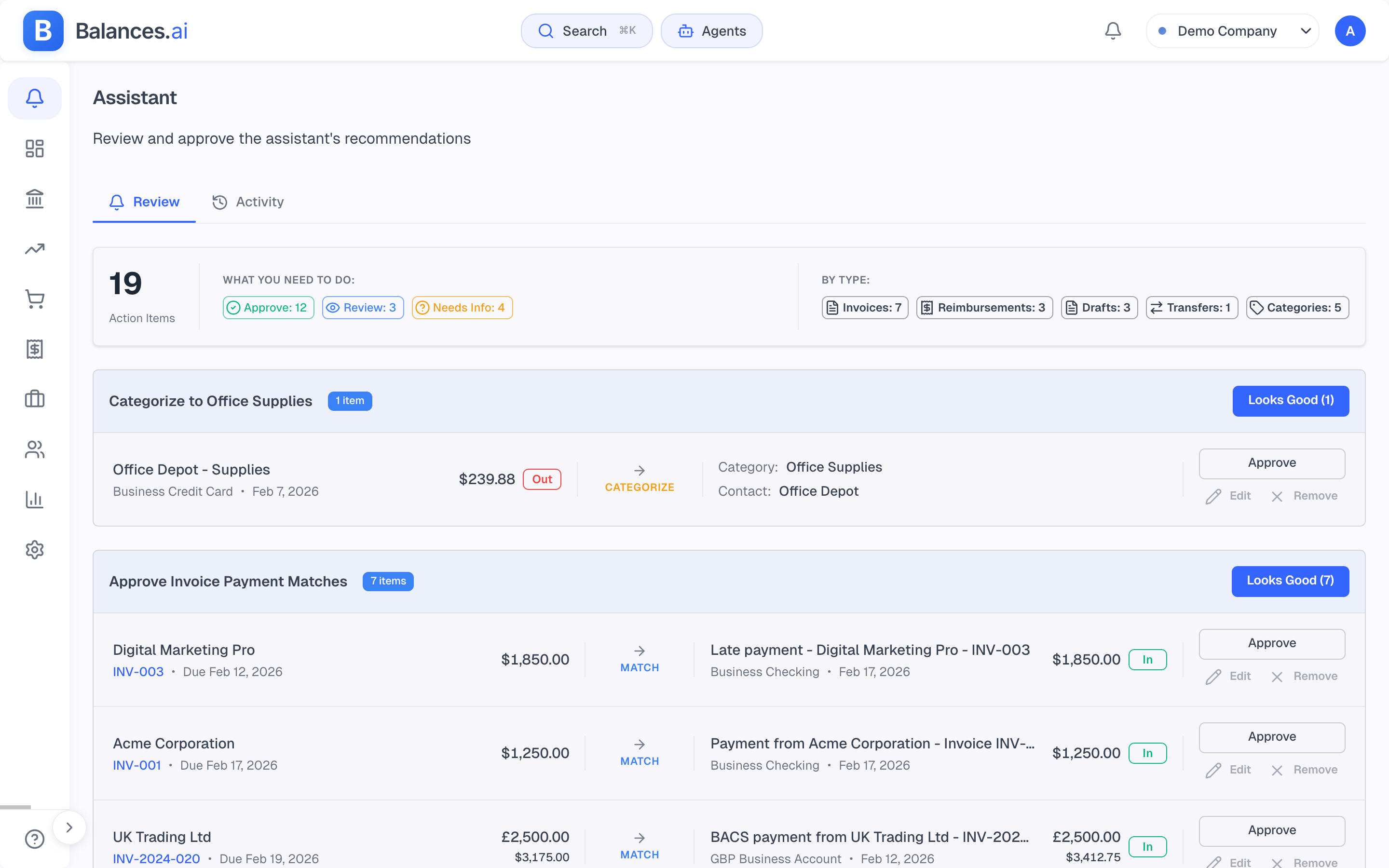
Everything the AI touched, in one queue
The Review feed puts everything waiting on you in one place. New transactions it categorized, receipts it matched to invoices and bills, transfers it paired, reimbursements and draft documents — all waiting in one list. Approve them one at a time, in batches, or clear the whole queue at once.
Categorizations, invoice & bill matches, transfers, reimbursements, drafts — one list
Every suggestion shows a confidence level before you approve
Approve one, "Approve all" a batch, or "Approve everything" at once
Change a whole group's category or contact, then approve it in one step
Keyboard first
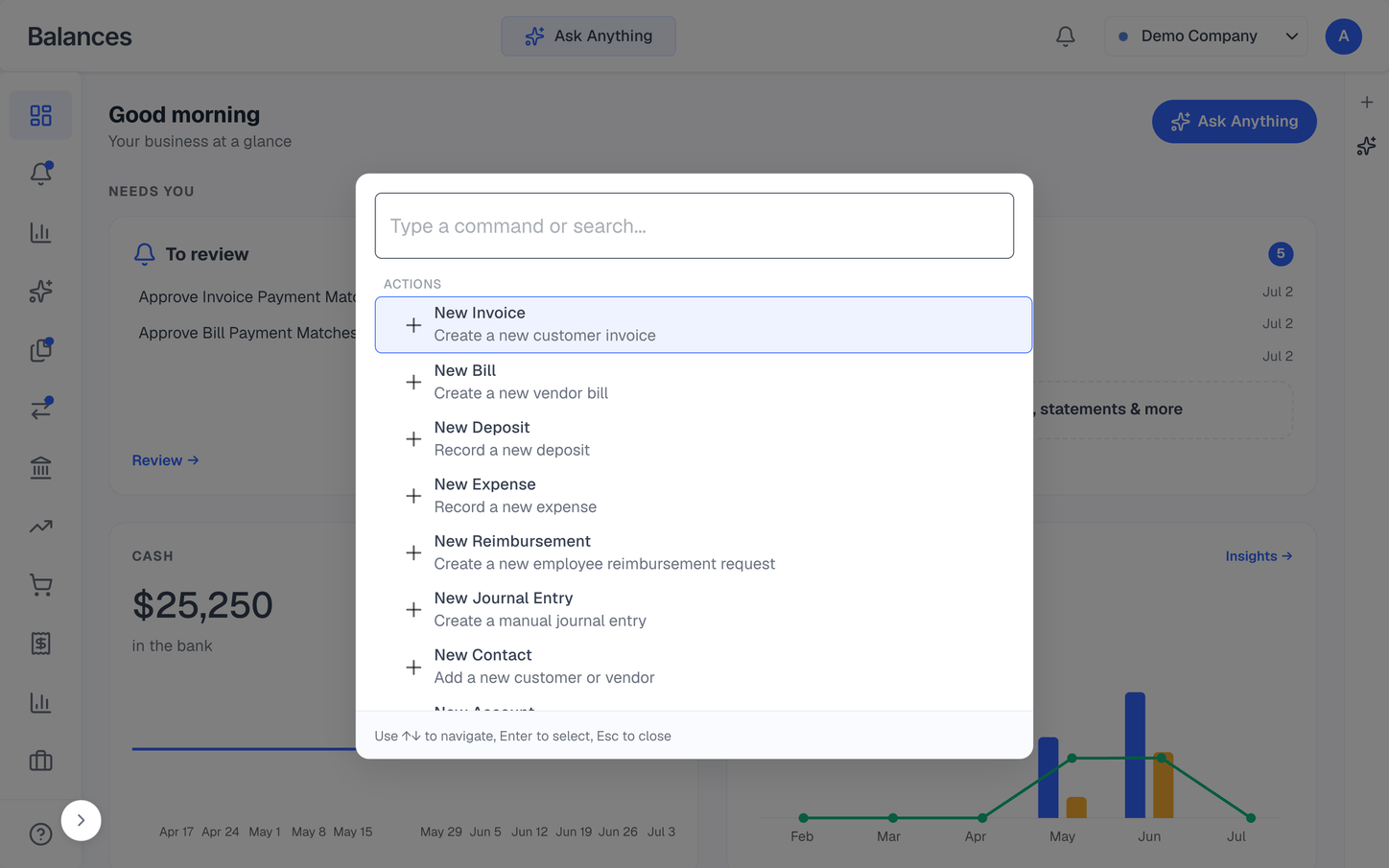
Create anything in two keystrokes
Press ⌘K from anywhere to jump to any page or spin up any record — an invoice, a bill, an expense, a journal entry, a contact — without hunting through menus.
⌘K opens the command palette from any screen
Create invoices, bills, expenses, deposits, journal entries, and contacts
Jump straight to any page or report
Keyboard-first — arrow to navigate, Enter to go
Get paid
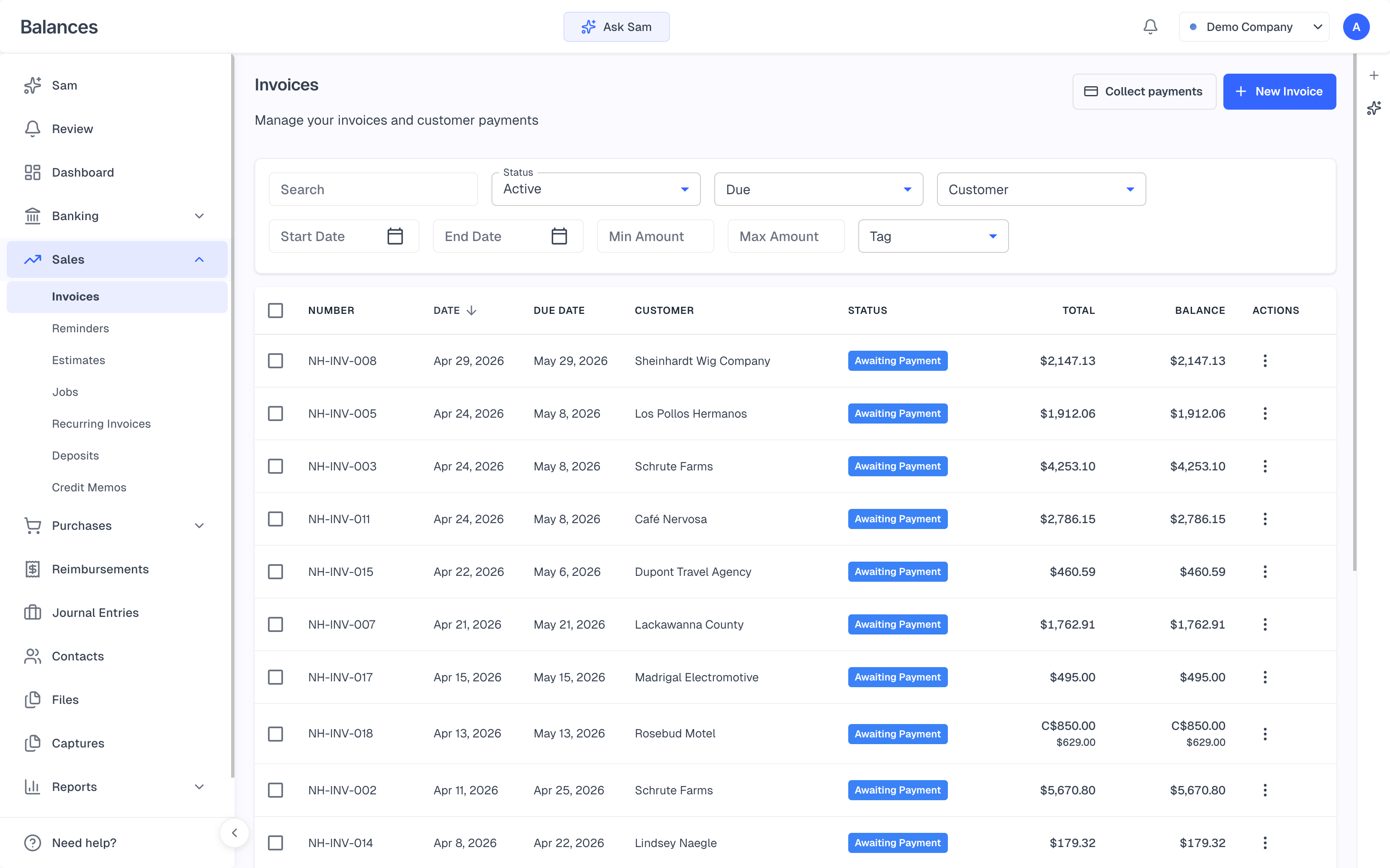
Invoices, estimates, and payments in one place
Send a branded estimate, let the customer accept it online, and convert it to an invoice in one click. Get paid by card or ACH bank transfer through Stripe — and Balances chases the late payers so you don't have to.
Pay-by-link invoices with card and ACH bank payments via Stripe
Estimates customers Accept online — one click to convert to an invoice
Milestone billing, recurring invoices, and automatic reminders
Branded invoices with your logo and colors; emails sent under your business name
Paperwork, handled
Receipts and bills that file themselves
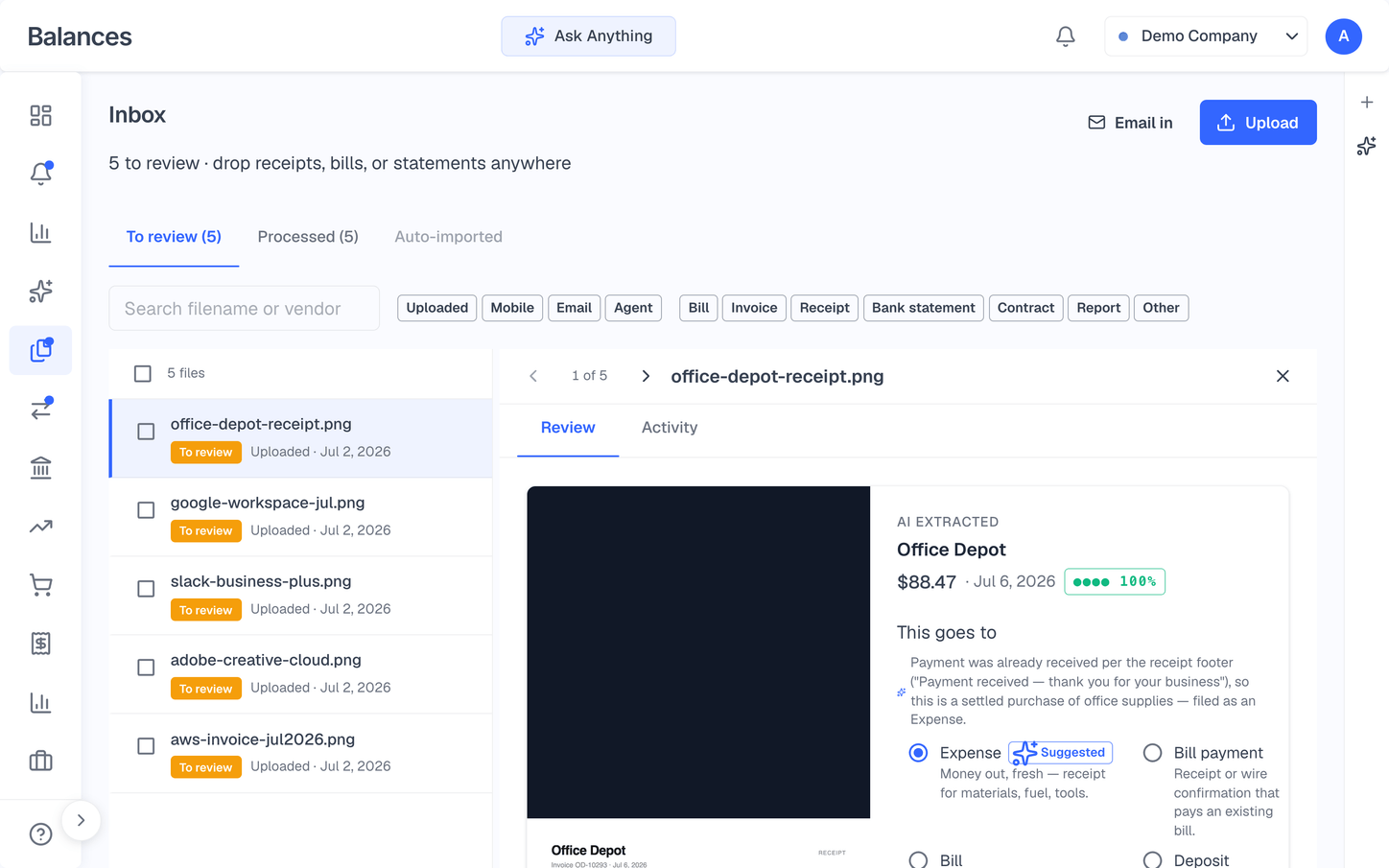
Email a receipt to your Inbox, or drop it in. Balances reads it, finds the matching bank charge, and files it without entering it twice. Bank statements land as a single reconcile-ready card instead of a pile of rows to sort.
Email receipts to your own Inbox address, or drag them in
OCR fills in the vendor, amount, and date — new vendors created for you
Auto-matched to the bank charge, so you avoid entering it twice
Attach contracts, POs, or receipts to any invoice, right from the Inbox
Know your numbers
Reports that actually tell you something
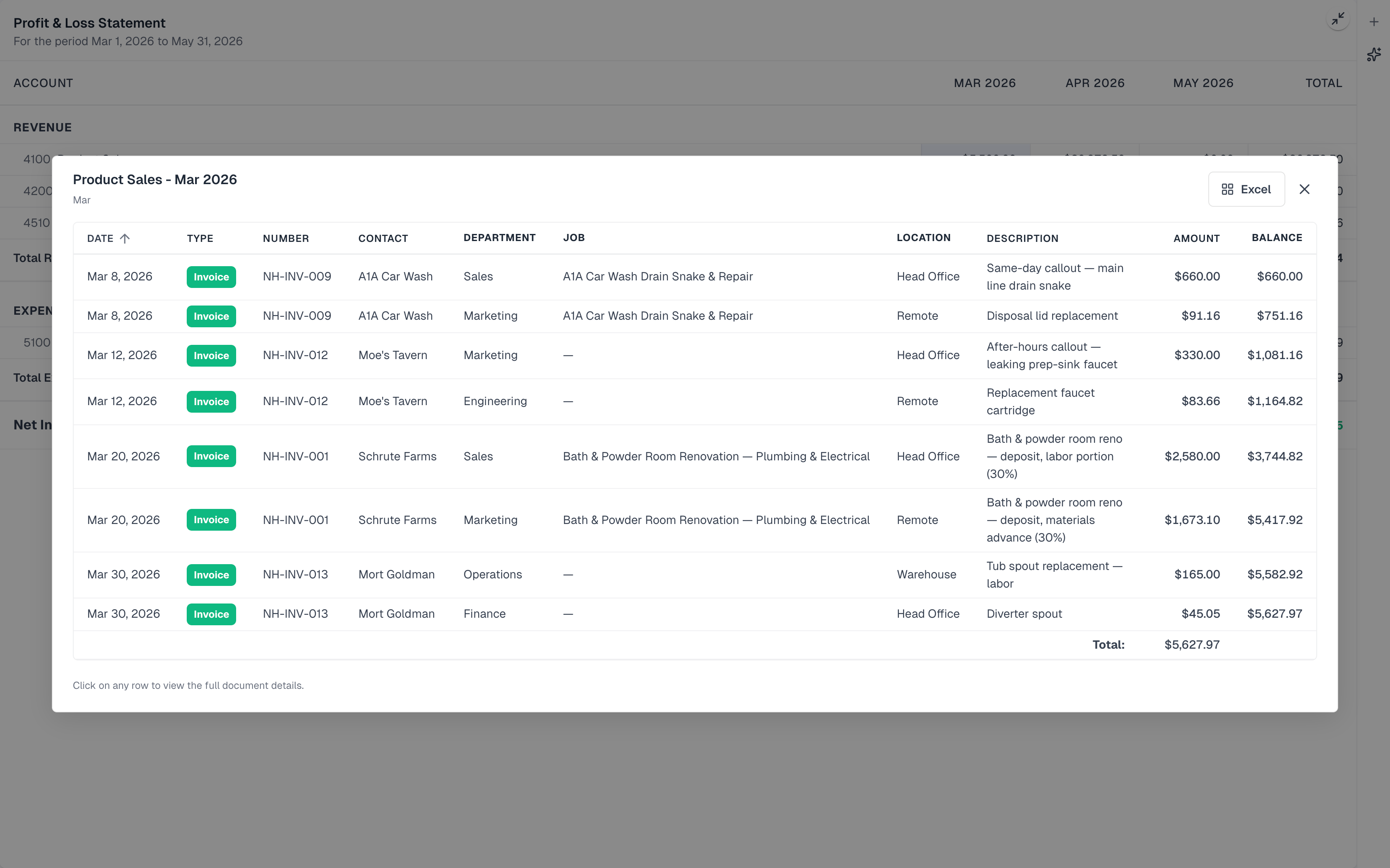
P&L, Balance Sheet, Cash Flow, AR/AP, job profitability — 17 reports, computed live from your ledger. Click any number to drill into the exact transactions behind it, compare periods, or hand your accountant a clean 1099 at year end.
Click any line item to drill down to the transactions behind it
Per-job P&L and project profitability
1099-NEC and sales tax reports built in
Period comparisons, plus one-click PDF or Excel export
Real accounting underneath
Reconciliation, done properly
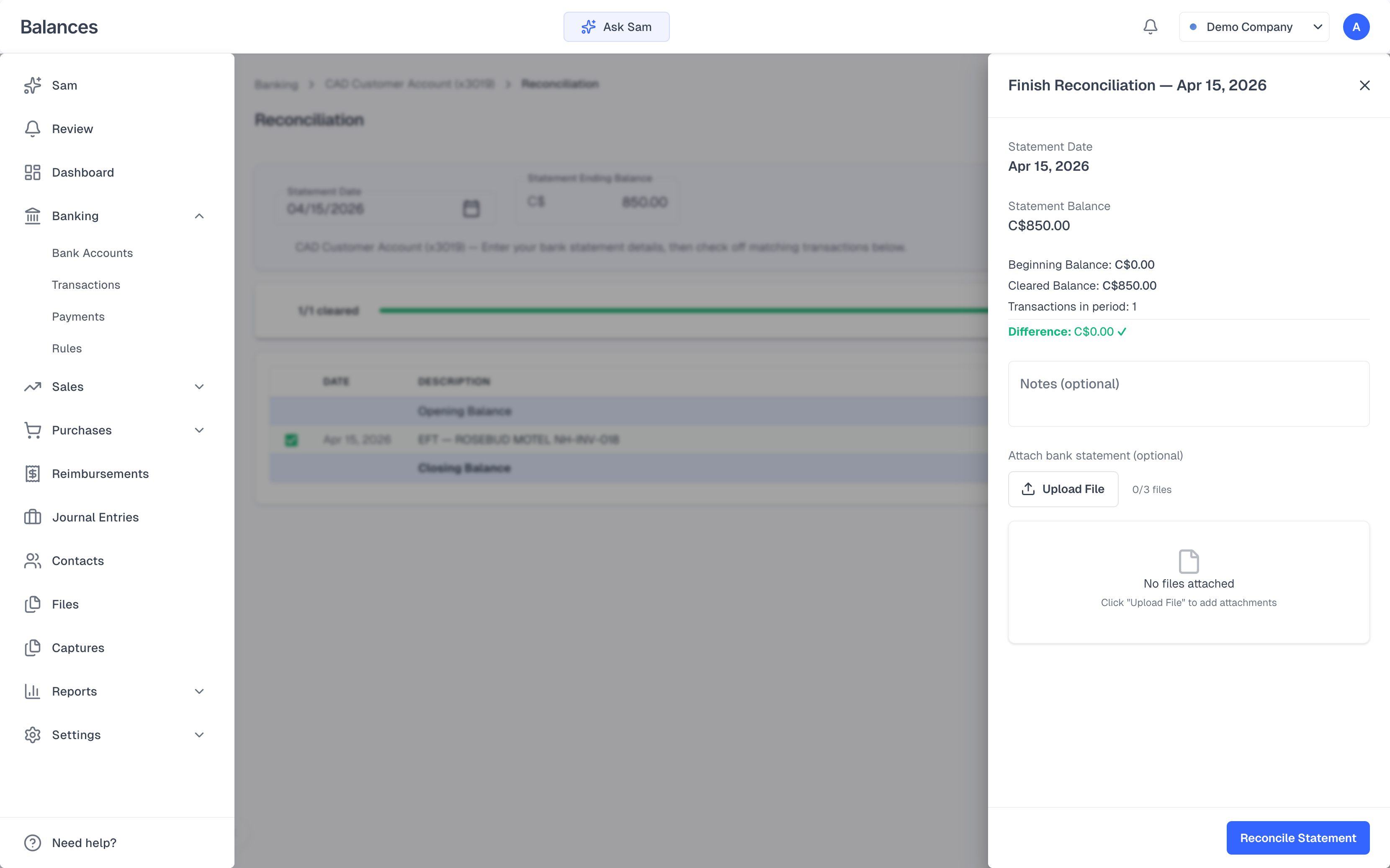
Enter the statement balance, check off transactions, and watch the running difference settle to zero — the same way you'd do it in QuickBooks or Xero, just faster. Real double-entry, accrual or cash basis, and full multi-currency underneath it all.
Live running difference as you check items — Finish activates at zero
Multi-currency with automatic FX gain/loss
Accrual or cash basis on a real double-entry general ledger
Every change tracked in a full activity history
Built for more than one
Every company from one login
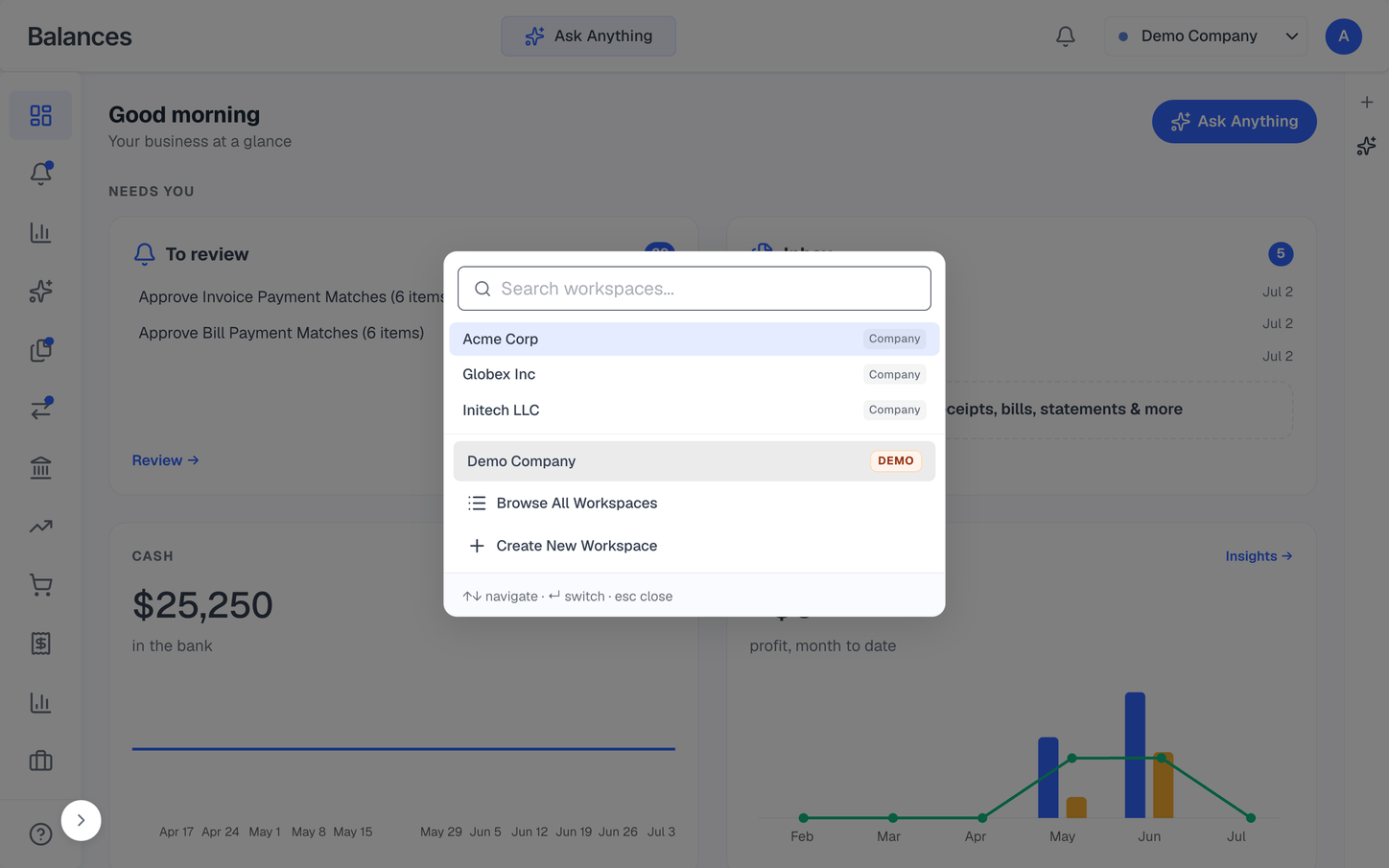
Run several businesses, or manage a book of clients, without logging in and out. Switch between workspaces in a keystroke — each with its own books, currencies, and team.
Switch companies instantly from one account
Separate books, chart of accounts, and currencies per workspace
Role-based team access per company
Connected Workspaces to share expenses and bills between companies you run
Switching
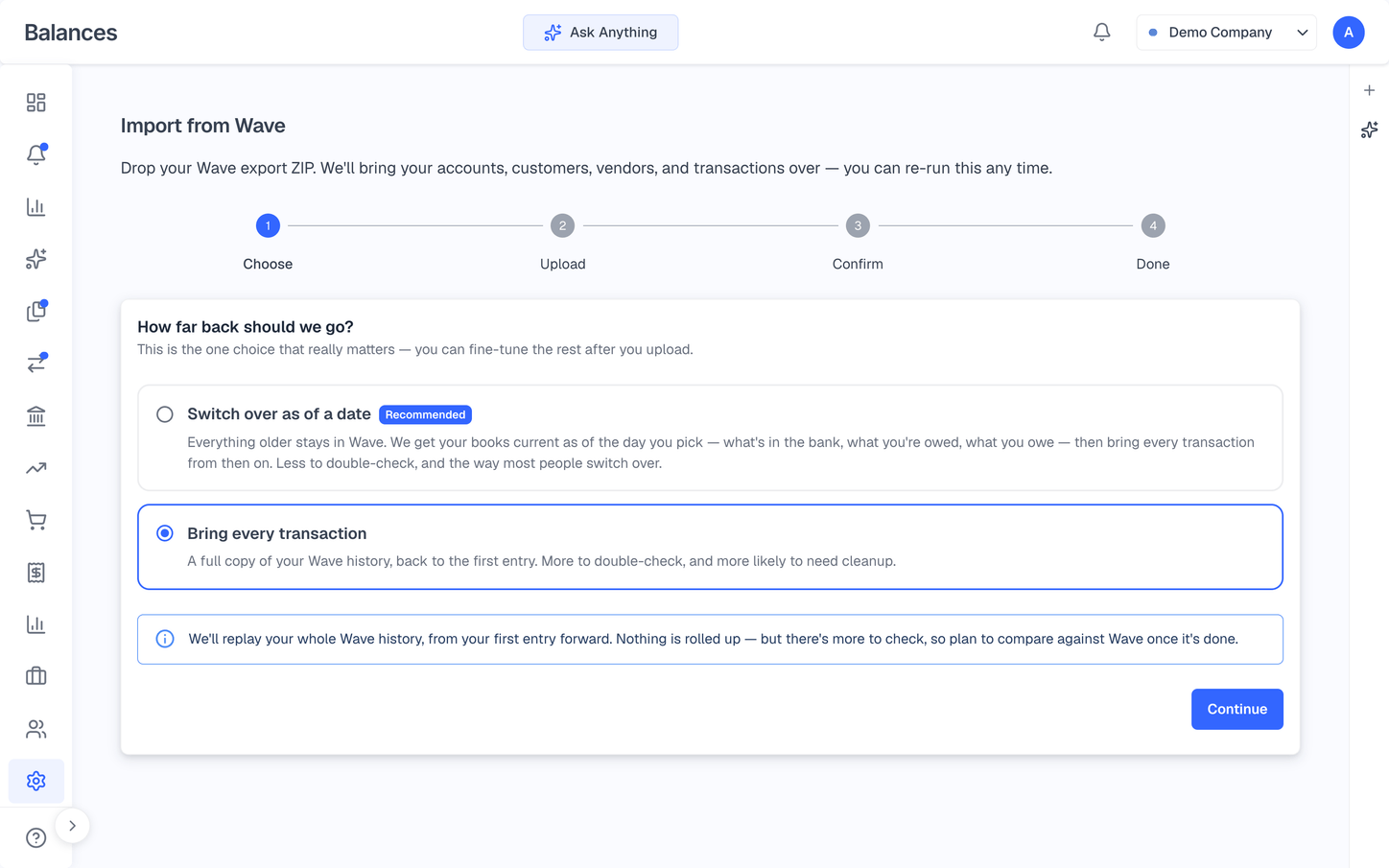
Move from Wave without starting over
Import your full history from Wave — chart of accounts, contacts, bank connections, and every transaction — in a few minutes. Onboarding asks what you're coming from and sets a clean changeover date, so nothing gets double-counted.
Full Wave import: accounts, contacts, banking, and transaction history
Bring your entire history, or switch over as of a clean date
Connect Plaid to imported accounts — matched by last four, with duplicate detection
Coming from QuickBooks or Xero? The agent guides your changeover
And a lot more.
The depth that usually means paying for a second tool — built in.
Jobs & project profitability
Live gross profit and margin on every job.
Automatic payment reminders
Escalating nudges go out until you're paid.
Full data export
Export your whole ledger anytime. No lock-in.
Card-fee surcharge
Pass card fees to payers — ACH stays free.
Recurring journal entries
Depreciation and accruals post on schedule.
Credit memos & vendor credits
Issue and apply credits in either direction.
Tags & custom dimensions
Track by department, location, class, or project.
Invoice milestones
Progress-bill large projects in stages.
Billable expenses
Push job costs straight onto the client invoice.
Pricing
Start free for your personal finances. Upgrade when you launch a business — 14-day trial, cancel anytime.
Personal
For your personal finances
Free
forever
Unlimited bank & credit card accounts
AI-powered transaction categorization
Budgets & spending insights
Net worth & cash flow tracking
Forward expenses to your business
No credit card required
Pro
Complete accounting for one business
$20
per business / month
Unlimited bank & credit card accounts
AI agent that takes your instructions
MCP connector for Claude and ChatGPT
Auto-categorize transactions
Connect banks via Plaid or CSV
Send invoices with payment links
Automate recurring invoices
Track bills and payables
Employee reimbursements
17 reports — PDF & Excel export
Accrual and cash basis
Unlimited team members
Global
For one business operating internationally
$40
per business / month
Everything in Pro, plus:
Invoice and bill in any currency
Foreign currency bank accounts
Track FX gains & losses automatically
Live exchange rates built in
Personal is free forever. Pro and Global are priced per business — each company you add is its own $20 or $40 per month subscription, with unlimited team members included. Business plans include a 14-day free trial. Cancel anytime. Prices in USD. Questions? Contact us
Two ways to use Balances
Pick the one that sounds like you.
Run a business
For your business
Get the finances off your plate so you can get back to billable work.
• Invoice clients, take payments, track jobs
• AI categorization and reconciliation
• Accrual or cash reports, ready to hand to your accountant
Manage clients
For your clients' books
Accounting firms and bookkeepers: serve more clients in less time. One dashboard, role-based access, agent-assisted cleanup.
• One dashboard across every client workspace
• Agent-assisted categorization and cleanup
• Role-based access — clients, staff, partners
Just want to track your personal finances? Personal is free forever →
Balances in your pocket
The Balances iPhone app is out of beta and available to everyone. Snap a receipt and let the AI extract the details, review and approve transactions from anywhere, and ask about your books in plain English — all synced with your workspace on the web.
Download on the App StoreFree to download — works with your Balances account.Most accounting software was designed 20 years ago. You click through menus, fill out forms, and wait for reports.
We think you should just be able to say what you need.
So we built Balances around the agent. It isn't a feature — it's the interface.
Alex Campbell
Founder, Balances