For accountants & bookkeepers
Every client’s books.
One firm workspace.
Balances has a firm mode built for bookkeepers and accountants. See what’s waiting at every client from one list, set up client workspaces your firm owns, and teach the agent how your firm works once. You keep the client relationship.
Each new client workspace starts with a 14-day free trial, no card needed.
Your client list
See what’s waiting at every client
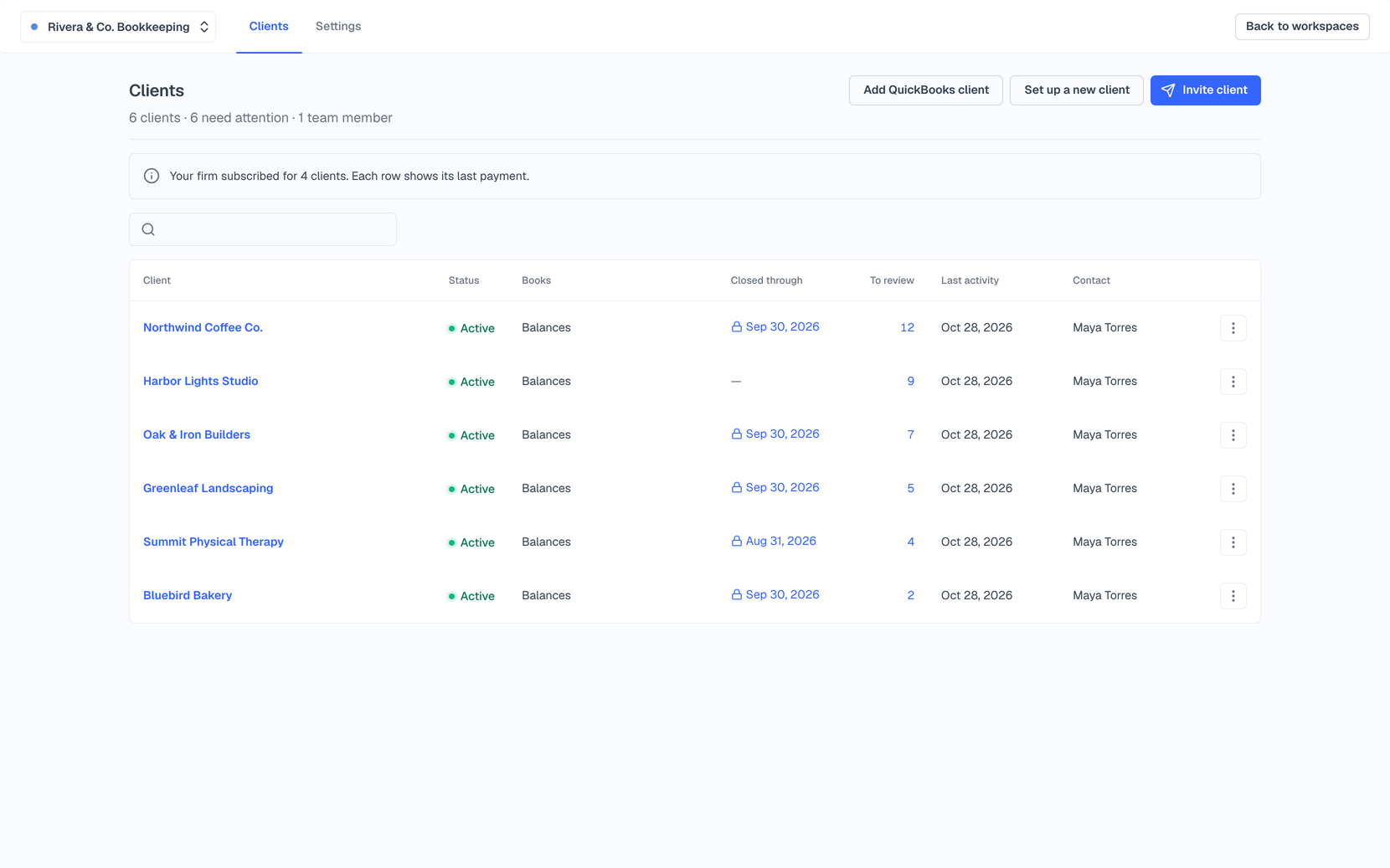
Sign up as a bookkeeper or accountant and you land on your Clients list. Each row shows the client’s status, the date their books are closed through, how many transactions are waiting for review, and their last activity. Clients that need attention sort to the top, and “To review” takes you straight to the work.
Status, Closed through, To review and Last activity for every client
A Billing column showing who subscribed and when the trial ends
Search clients, and keep inactive ones out of the way
Switch between clients with ⌘E, with your clients listed apart from your own workspaces
Clients
Set up a client, or invite one you already have
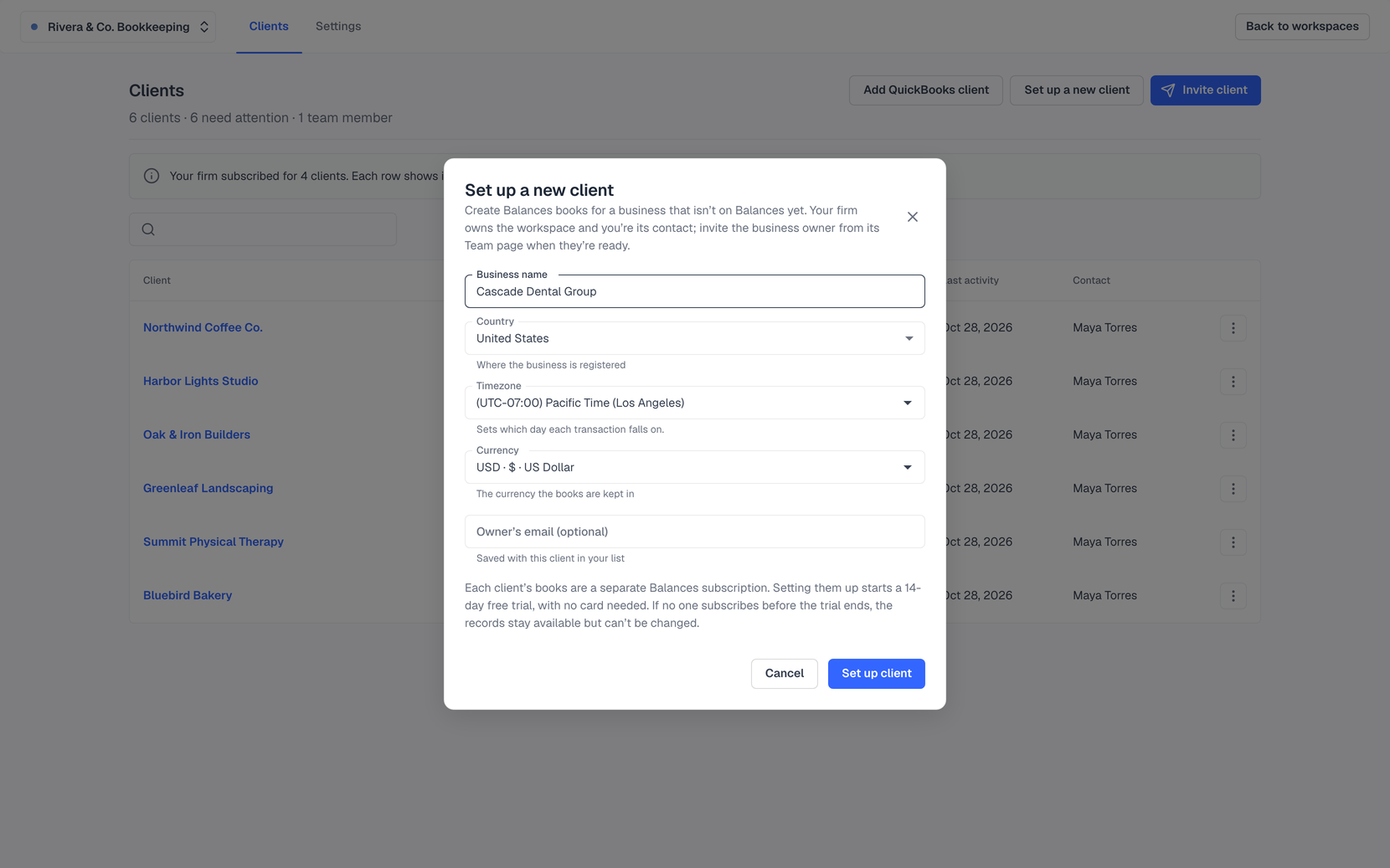
“Set up a new client” asks for a business name, country, timezone and currency, and the workspace belongs to your firm, with you as the point of contact. Already working with a client who uses Balances? Invite them, and they pick the workspace to share and accept. History names both the person and your firm on changes your team makes.
Client workspaces your firm owns, which can’t be deleted out from under you
Change the client’s point of contact whenever you need to
Invitations that name your firm before the client signs in
Resend or cancel invitations, and remove a client when you part ways
Your firm’s way of working
Teach the agent once, for every client
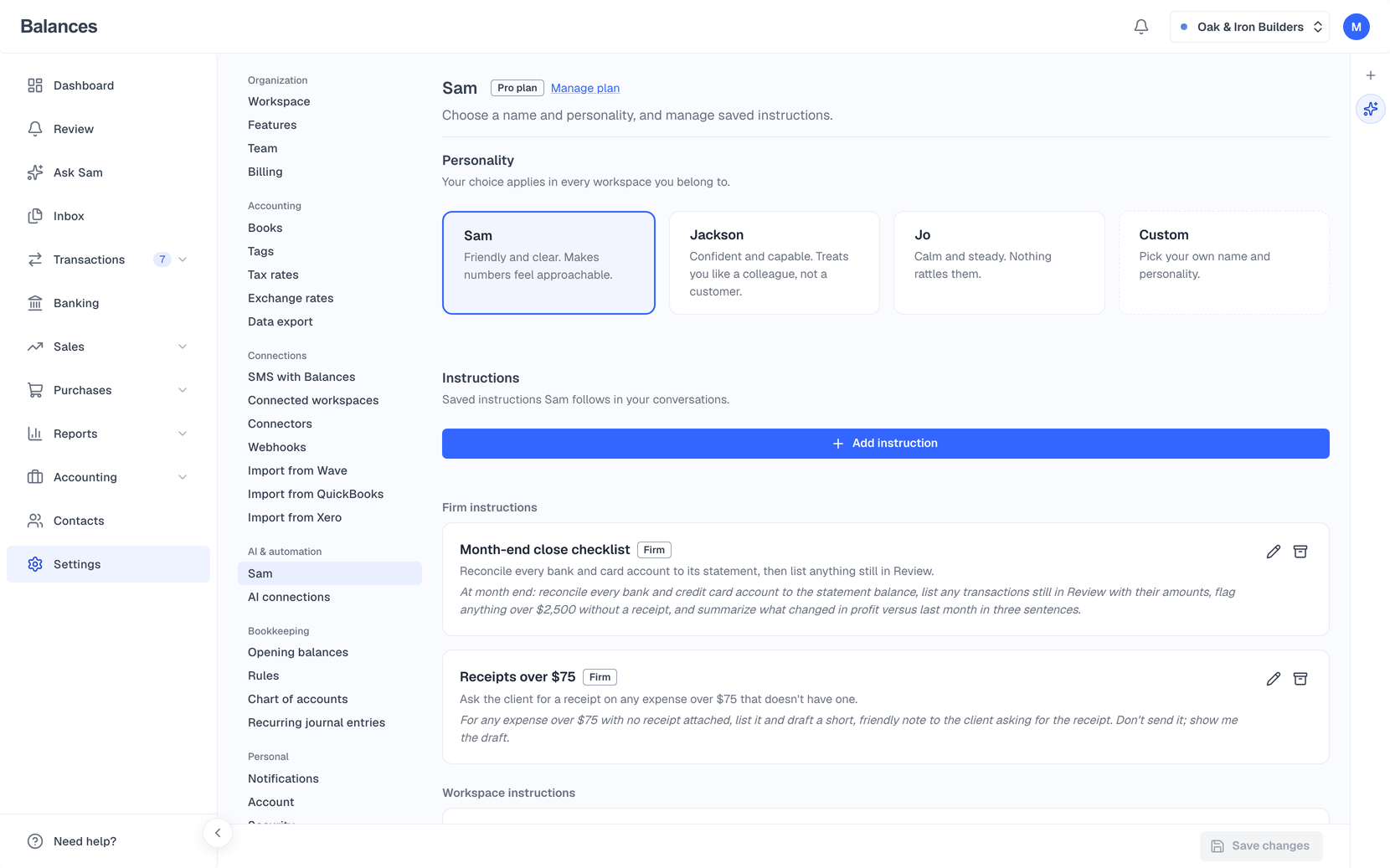
Write instructions in plain English and scope them to your whole firm, and they apply in every client workspace. Close a period with “Lock books” from the client list, and nobody can post or change anything dated on or before it. Invite your team as admins or members.
Firm-wide agent instructions that cascade to every client
“Lock books” and “Unlock books” per client, from the client list
Invite teammates as Admin or Member from Firm Settings
Your firm’s own address in Balances, which you can change
AI with limits
Give an AI one client’s books, not all of them
When someone on your team connects Claude or ChatGPT, they tick which client workspaces it can reach. It never gets more access than that person’s own role, and every change it makes shows in that client’s Activity History, for example “Dana Lee (Rivera & Co) via Claude (AI connection)”.
Choose the client workspaces each connection can reach
No more than the person’s own role: a View-only member’s AI can only read
Each change names the person, the firm and the AI it came through
Also for firms
Create a firm anytime
“Create new firm” from the workspace switcher, without redoing onboarding. Your firm’s own books stay in an ordinary workspace.
Ask in chat
Firm admins can ask the agent to invite a client’s team or turn on billable expenses for a client.
On your phone
On a phone, each client in the list stacks into a single row, and the iPhone app shows your firm and its clients under one search.
Clients switching software
Bring a client’s books over from QuickBooks Online, Xero or Wave with the import in Settings.
Their own AI, their own access
Clients can connect Claude or ChatGPT to their own books and tick which of their workspaces it can reach.
Clients still on QuickBooks
“Add QuickBooks client” puts a client whose books live in QuickBooks Online on your client list, connected by signing in to their company.
Questions
How does billing work for client workspaces?
Each client’s books are their own Balances subscription, and either your firm or the client can subscribe. A new client workspace starts with a 14-day free trial with no card needed, and the client list shows who subscribed and when each trial ends.
Does Balances replace my firm?
No. Balances is software. Your firm does the review, the advice and the sign-off; Balances gives you and your clients one place to keep the books, with an agent that speeds up the routine work.
Who owns a client workspace my firm sets up?
Your firm does. The firm admin who set it up holds the point-of-contact seat, a firm admin can reassign it, and nobody can delete a firm-owned workspace.
Can my client still log in and use it?
Yes. Invite the client’s team and they work in the same books you do, with their own invoicing, receipts and reports.
Something else on your mind? Talk to our founder.
Keep exploring
AI agent & Review
An agent in every workspace you can ask to record a bill, find what a customer owes, or set up a rule. What it suggests on its own waits for you in Review.
Bank feeds & reconciliation
Connect your bank through Plaid or import a statement, approve the categories, pair your transfers, and reconcile to your statement balance.
Reports & Profit Insights
P&L, Balance Sheet, Cash Flow, aging, sales tax, 1099-NEC and more, computed live from your ledger. Profit Insights tells you what changed and why.
Or see everything Balances does.
Bring a client over
Talk to our founder about your firm, or start a firm workspace and set up your first client today.