The agent
Ask in plain English.
Approve what matters.
Every Balances workspace comes with an agent you talk to, named Sam by default. Ask it to record a bill, find out what a customer owes, or set up a rule, and see exactly what will change before you say yes. What it suggests on its own waits in one Review queue until you approve it.
14-day free trial. Pro is $20/month per business.
Ask for it
Say what you need. See what will change.
Ask the agent to record an invoice, bill, expense or deposit and it prepares the entry with a plain summary of what will change. Reply yes and it’s saved, and the agent tells you exactly what was recorded. Deletes, voids and emails to customers always wait for your yes.
Record invoices, bills, expenses and deposits by asking
A plain summary of every change, shown before you say yes
Approve a whole plan at once, or only part of it: “yes to the first three”
Checks your books for an expense or deposit that may be the same money, and asks you first
Review
Everything it suggests, in one queue
New transactions Balances categorized, transfers it paired, reimbursements and drafts all wait in Review, with any matching Inbox receipt shown on its charge. Each suggestion says why, such as a rule you saved, how you booked that vendor before, or the open invoice it settles.
Approve one, “Approve all” a group with Undo, or “Approve every bank line”
Charges that might be a transfer, or the payment of an open invoice or bill, wait for you to check them one by one
Edits you make show “Changed, not yet approved” until you approve them
See every category you’ve used for a vendor, how often, and when
Teach it
Your rules, in your words
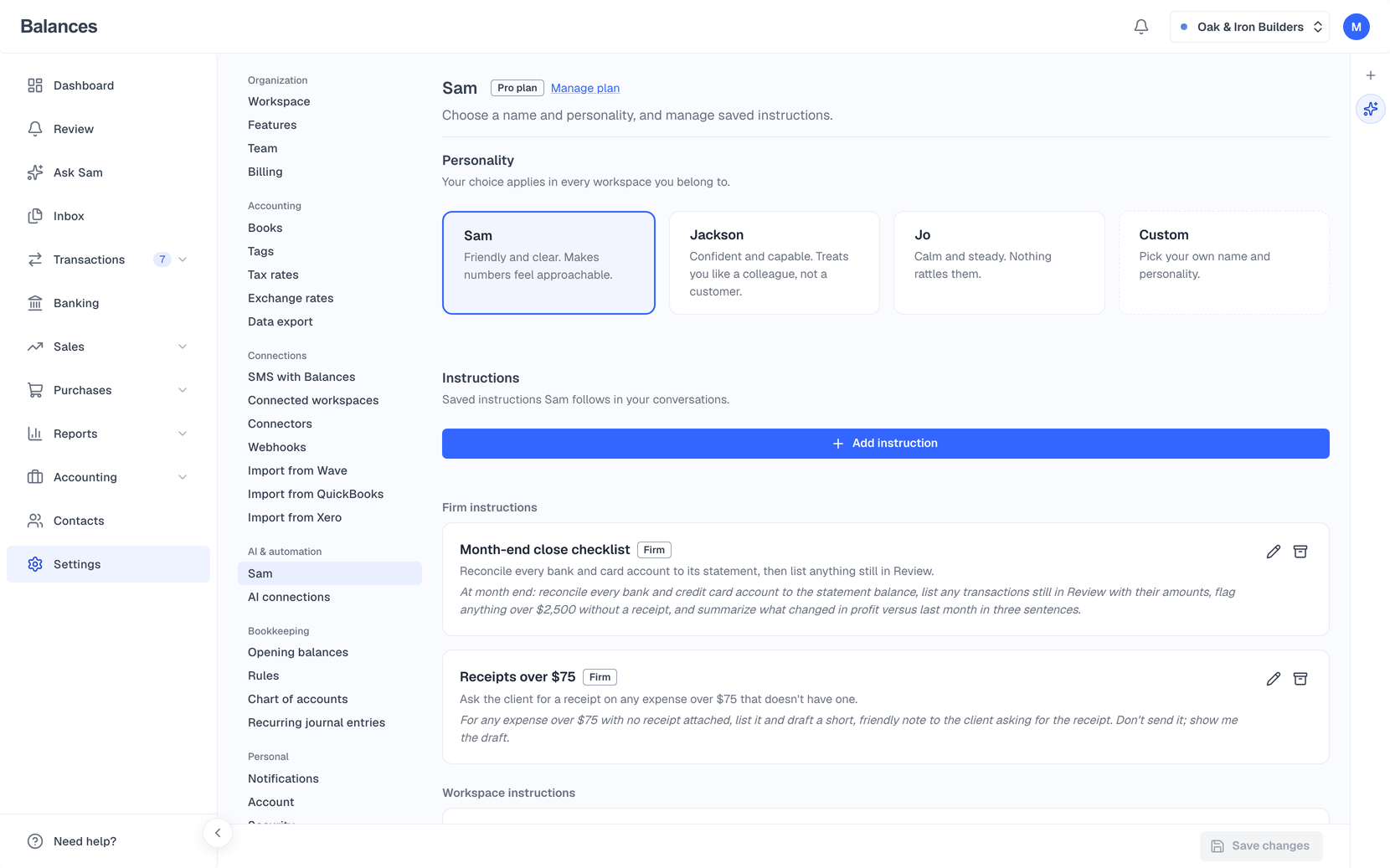
Name the agent and describe how it should talk to you. Save instructions in plain English, like “use account 6100 for office supplies,” and run any of them by typing /. Pin a vendor to a category and its future charges arrive in Review already set to it, ready for you to approve.
Keep Sam, switch to Jackson or Jo, or name it yourself
Instructions for you alone, your whole workspace, or your whole firm
Save a vendor rule in chat and the agent tells you how many waiting transactions it covers
Create a rule by telling the agent, or from the transaction itself
Activity History
See everything it changed
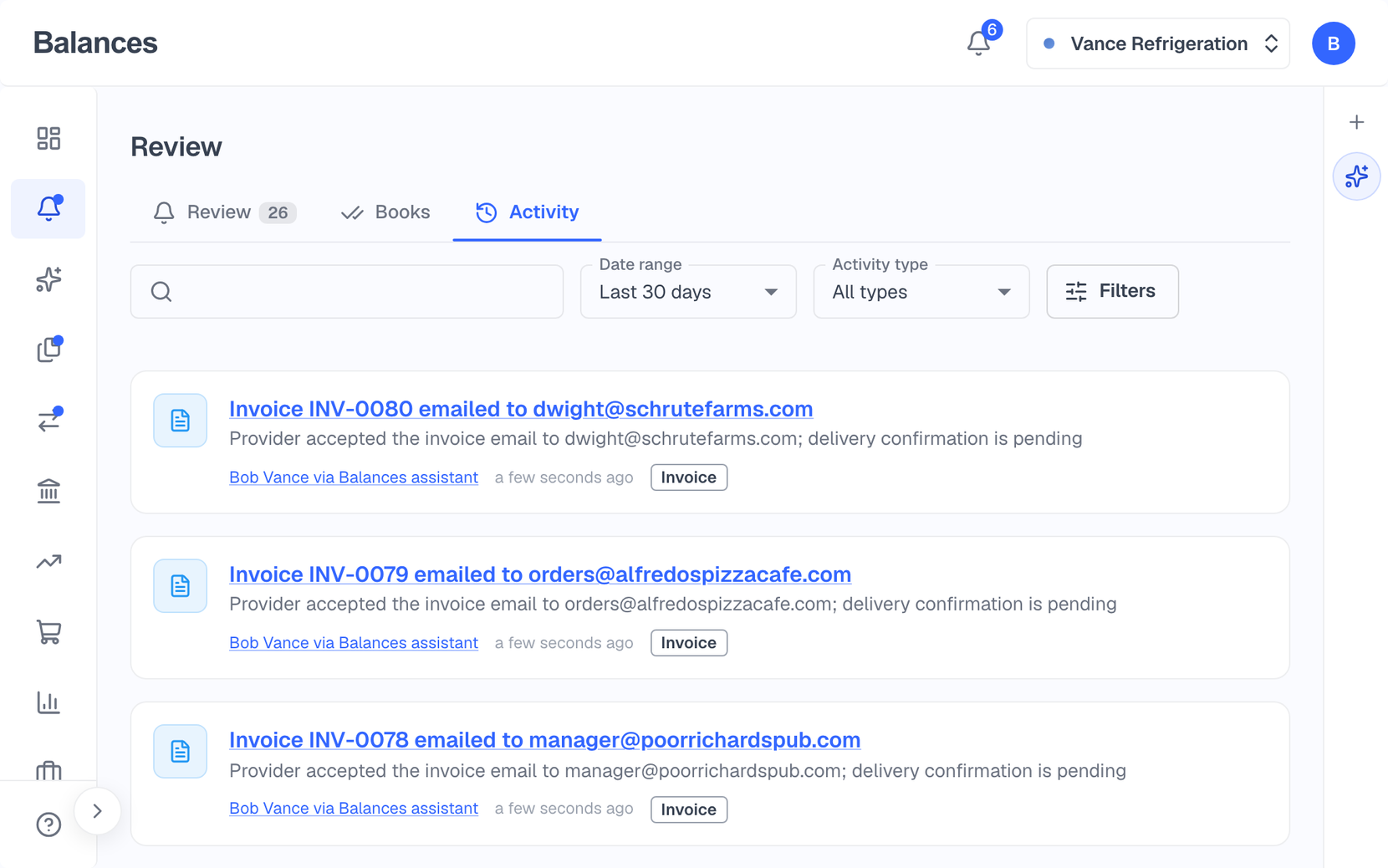
Every change the agent makes is recorded under your name in Activity History, marked “via Balances assistant” and linked to the chat it came from. Changes made through your own Claude or ChatGPT read “via Claude (AI connection)”. Open any record to see who changed it, when, and what it was before.
Each change names the person and the AI it came through
Before and after values in plain words, like “Office Supplies → Software”
Search the whole history, or filter it by account or payment
On your iPhone
Ask from your phone
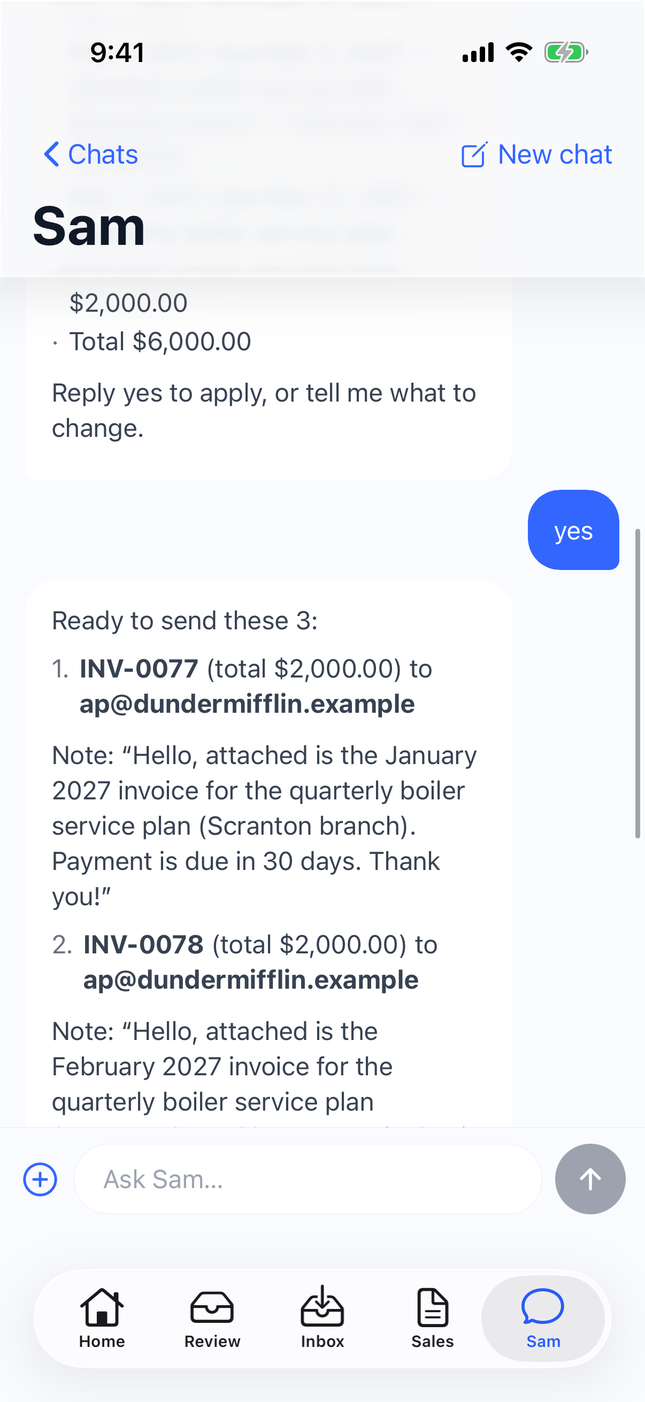
The same agent is in the Balances iPhone app. Ask for what you need, read its summary of what will change, and reply yes, wherever you are.
Every conversation from the web, on your phone
The same plain summary before you say yes
Start a new chat from the + menu
More ways to use it
Text Balances
Text a receipt photo or a question to the Balances number. Switch workspaces by name.
Open it from anywhere
Press ⌘I (Ctrl+I on Windows) on any screen to open the agent beside what you’re working on.
Dictate
Use the microphone button in Chrome and Edge. The audio never reaches Balances.
Reconcile with Sam
Upload your statement and the agent walks you through the reconciliation.
Answers from your own books
Ask what a customer owes, what changed in your profit, or when cash gets tight.
Record a check by saying so
Tell it “I wrote a $250 check from checking today” and it prepares the expense, ready to match when the check clears.
Estimates from a list
Paste a list of jobs and it drafts an estimate for each, adding customers you don’t have yet, for you to approve.
A second look at your books
Ask it to review your books. It reads your statements and books checks, then points out what looks off and where to fix it.
Set up by chat
At sign-up it asks what your business does and where it’s based. Later, drop your logo in chat to brand your invoices.
Runs on Claude
The built-in agent runs on Claude, from Anthropic. It comes with every plan at no extra charge.
Questions
Will the agent change my books without asking?
Changes to your books wait for you. When you ask for something directly, like “record this bill,” the agent prepares it and shows you a plain summary of what will change, and it’s saved when you reply yes. Suggestions it makes on its own, like a category for a new transaction, wait in Review. A few small steps you ask for apply right away, like filing a receipt from your Inbox, adding a contact or renaming the agent.
Can I use my own Claude or ChatGPT instead?
Yes. Pro and Global include a connection for Claude, ChatGPT and other apps that support MCP. Balances asks the connected app to show you most changes and check with you before applying them, and records who made each change and through which app. See Bring your own agent for setup.
Does the AI do the math?
No. The agent turns what you ask for into a change, and Balances posts it to a double-entry ledger that every report is computed from. The summary you approve is written by Balances from the stored change, not by the AI.
What won’t Balances do?
It doesn’t prepare or file taxes, run payroll, or send money to vendors: bill payments are recorded, not sent. Tax treatment stays with your accountant, and the agent says so when it comes up.
Does it replace my accountant?
No. Balances is software you use to run your books. Your accountant can work in the same books with you, and accounting firms can manage their clients’ books in Balances.
Does it cost extra?
No. The agent is part of every plan, including the 14-day free trial.
Something else on your mind? Talk to our founder.
Keep exploring
Bring your own AI
Connect Claude or ChatGPT to your books. Balances asks the app to show you most changes before applying them, and records who made each change and through which app.
Bank feeds & reconciliation
Connect your bank through Plaid or import a statement, approve the categories, pair your transfers, and reconcile to your statement balance.
Receipts & bills
Forward receipts and bills to your own Inbox address, snap or text a photo, then match each one to its bank charge. Drop a supplier’s PDF on a bill and it fills itself in.
Or see everything Balances does.
Ask your first question
Start a trial, connect a bank account, and ask the agent what needs your attention.