Receipts & bills
Forward it, snap it, text it.
It lands in your Inbox.
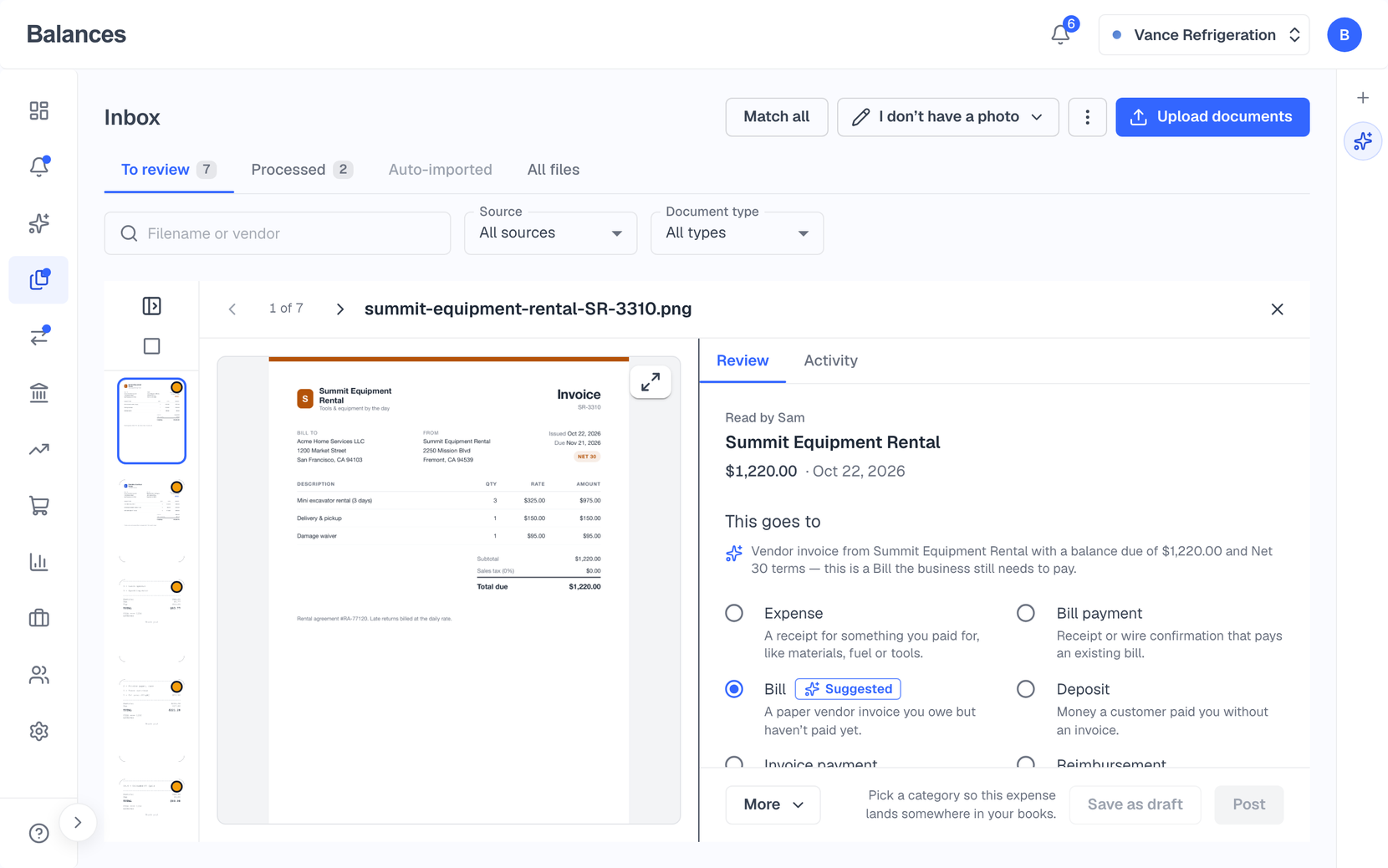
Every workspace has its own email address for receipts and bills. Forward them, drag them in, snap them on your iPhone or text a photo. Each one shows up with where it goes and the bank charge it matches, so you can file it in a click.
14-day free trial. Pro is $20/month per business.
Inbox
One address for every receipt and bill
Your Inbox address is named after your business, and admins can rename it. Forward an email and Balances shows what it became.
Forward by email, drag files in, or attach dozens in one chat
Snap receipts in the iPhone app, or text a photo to the Balances number
Reads the amount actually charged, with tax and shipping
Suggests where it goes: expense, bill, bill payment, deposit or reimbursement
Matching
Matched to the bank charge
Balances suggests the bank charge each receipt belongs to, and you confirm it. “Match all” files every receipt with a single exact match in one go. When a tip changed the total, it offers the likely charge. A receipt that arrives late attaches to the expense you already booked.
“Match all” for receipts with one exact bank match
“Possible charge” when a tip changed the total
“Split…” breaks one receipt into several purchases you file separately
Foreign-currency receipts matched to the card charge that paid them
Bills
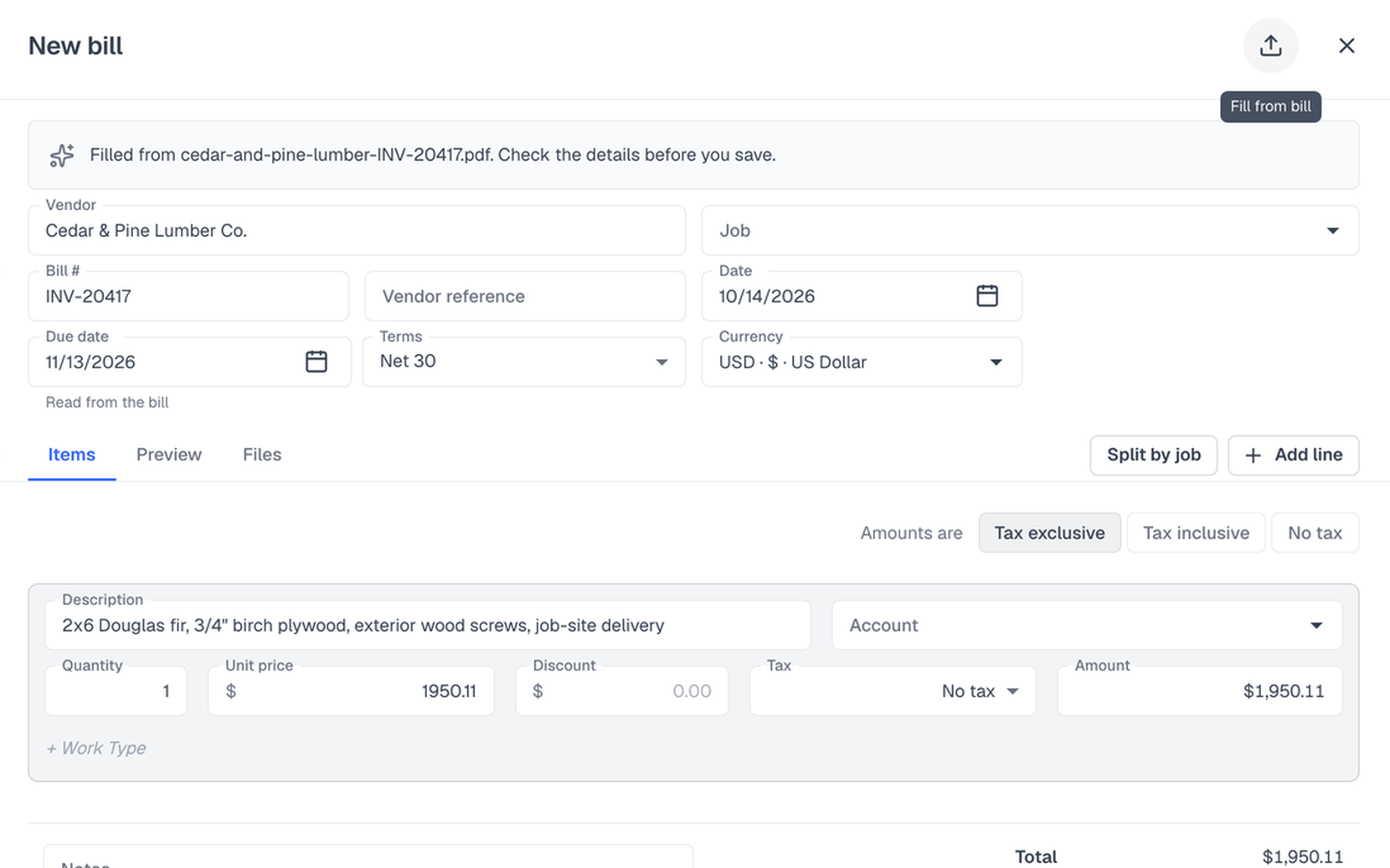
Drop in a supplier’s PDF. The bill fills itself in.
Drop a supplier’s PDF or a photo on a new bill and Balances fills in the vendor, bill number, dates and total, without touching anything you’ve already typed. Record payments against bills when you pay them, and track vendor credits alongside.
Fill from bill: vendor, bill number, dates and total
Record bill payments and vendor credits
Employee reimbursements with Submit all and Approve all
Files tabs on contacts, jobs and reimbursements
On your iPhone
Snap it where you paid
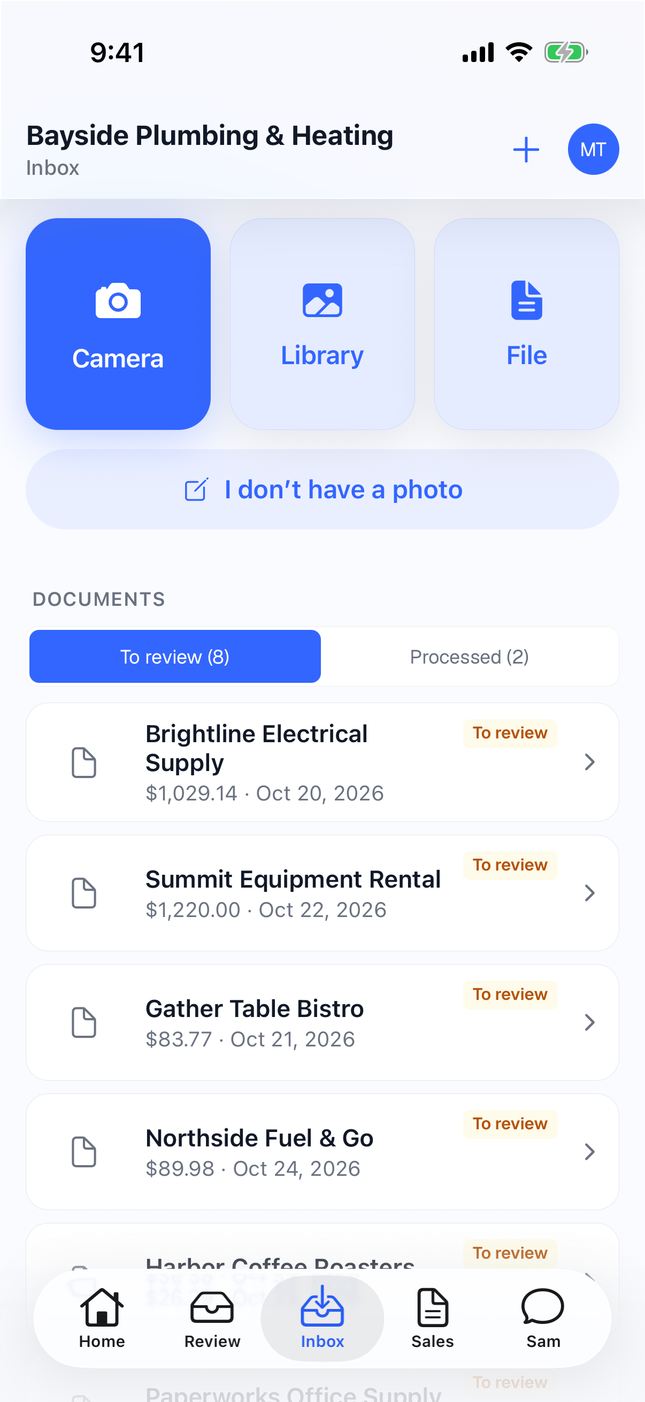
Open the Inbox in the Balances iPhone app and take a photo of the receipt, pick one from your library, or add a file. It lands in the same Inbox as everything you forward, read and ready to file.
Camera, photo library or a file from your phone
See what’s waiting to be filed, and what’s done
No photo? Add the details by hand
Also included
Find what’s missing
Filter for “No attachment” to find charges still waiting for a receipt.
Old receipts surface in Review
A receipt still in your Inbox 14 days after its date shows up in Review, so it doesn’t get lost.
Learns your coding
Categories are pre-filled from how you booked the same vendor before.
Late receipts sharpen suggestions
When a receipt arrives after its bank charge, Balances can refresh that charge’s suggestion with the receipt’s vendor and line items.
Questions
How do receipts get in?
Forward them to your workspace’s Inbox address, drag them in on the web, snap them in the iPhone app, or text a photo to the Balances number.
Who can send to my Inbox address?
Forward from the email address you sign in with. Anyone on your workspace can forward from theirs.
Does Balances pay my bills?
No. Balances tracks your bills and records the payments you make from your bank, so your books show what you owe and what you’ve paid.
Something else on your mind? Talk to our founder.
Keep exploring
Bank feeds & reconciliation
Connect your bank through Plaid or import a statement, approve the categories, pair your transfers, and reconcile to your statement balance.
AI agent & Review
An agent in every workspace you can ask to record a bill, find what a customer owes, or set up a rule. What it suggests on its own waits for you in Review.
Invoicing & payments
Send branded invoices with a pay link for card or ACH through Stripe, estimates customers accept online, recurring invoices, and reminders you switch on per invoice that then send on their own.
Or see everything Balances does.
Forward your first receipt
Start a trial and your Inbox address is ready straight away.